Can I get a MCP hype-train in the chat?
Greg Heffner Sept 28, 2025
If you have been paying attention to AI or LLM's you have probably heard about MCP servers. If not they are Model Context Protocols and you can think of them as tools to use with your LLM agents. I will be showcasing these MCP servers and how even YOU can use them for networking or looking for mentorship in your local area!
From one of my pervious blogs I wrote about Agentic AI and all the improvements it has. Yet today, AI still has varying range of success. When looking at most causes its either prompt issues or looping problems, LLMs making assumptions of what the intent of the user is, or just bad backend data. Luckily for us there are ways, for most applications you use, to be specific and more direct when making LLM queries that IMO have changed the game forever when measuring prompt generation success. I will be showing you in Visual Studio Code how to use two types of MCP servers (custom and official) and how you can use both types in conjunction if needed when making requests.
The two MCP servers I will be showcasing is the GitHub MCP Server and Sequential-Thinking server. The Sequential-Thinking server is the custom server of the two. There is a good video of how to create your own custom MCP servers that I wont really be going over in this blog but is very interesting and I would reccomend if you are looking for more advanced use cases.
Okay to the business... First when you open VScode youll need to make sure you are in agent mode and have selected the LLM of your choice. Then open the settings and then extentions to get to the "MCP Servers - Installed" section below "Installed" and "Reccommended" sections. Click the globe and it will open the vscode MCP server registry.

There are a number of offical tools you can use with VScode, as of writing this blog there are 43, and all you have to do to use them is follow the link which will take you to the offical github repo and then install the desired extention. Search for some interesting use cases and download away!
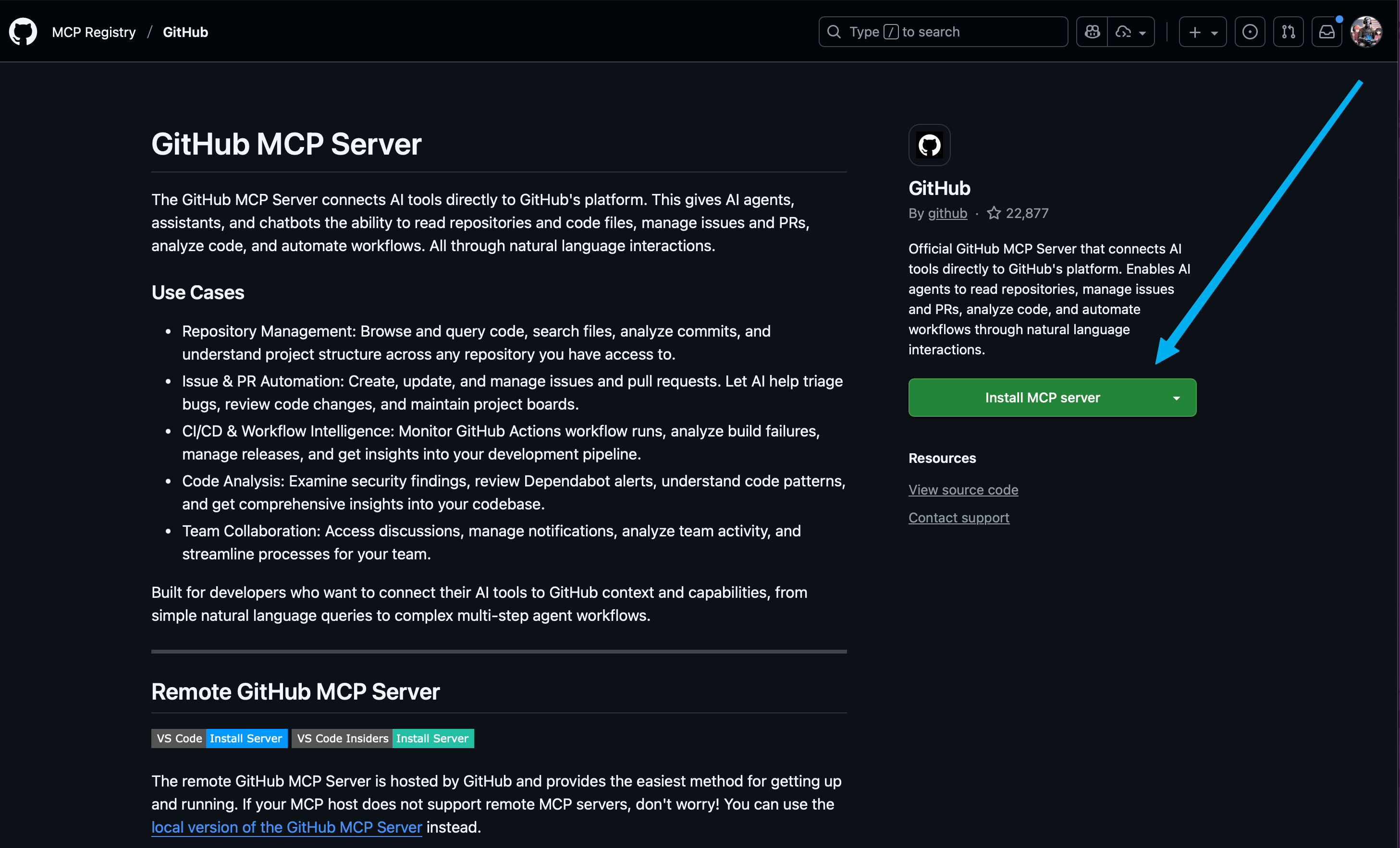
The number of custom server is endless though... In this example I will be using the SequentialThinking MCP server. This tool helps with structured thinking, refined thoughts, and advanced reasoning. To install this tool follow the github link above and then click the VS Code NPM install button under the "Usage with VS Code" section.
Once both are installed you should see the MCP servers in the VScode settings under extentions, and if you look at the bottom right corner of your chat window you should see a screwdriver and wrench "Tools" icon. If you click that tools icon you will see all the available tools you now have pop-up in the top search window of your VScode window. You may get a warning stating you have more tools than expected and performance may be degraded but you can ignore this for now. What you should be able to do though is scroll down until you see MCP Server: github/github-mcp-server and MCP Server: sequentialthinking. Click the arrow expanding each section and look at all the new tools you can use with your agents! Each of these tools have specific criteria and use cases but when the LLM agent is able to loop through them like a toolbox of commands and makes research more specific and refined rather than just a cast-net and a dream.

In the example below, I will show you three searches side by side. First is Agentic AI only with Claude Sonnet 4 as described earlier. Second is Agentic AI and Github MCP. Third is Agentic AI, Github MCP, and sequential thought MCP severs. I used a very generic OSINT search to find mentors for me based just on my public github profile name of @gregheffner.
As you can see in the first example Agentic AI did a great job of not only looking into repos to try to find answers
but
also searched other repos that could be related to me. Remember Agentic AI is wholistic. It will try to find answers
to
things as it can.
The second example you see not only is agentic AI doing the same search but it can use
github
specific tools withthe github MCP server. What it is able to do is not only take the same findings it would have
found
in the first example but then with the tools available in github mcp the LLM agent was able to loop through and do
better research specificially in repos and organizations that might be related. As you can see we got a great list
of
organizations we could reach out to that does mentorship programs that I could be interested in.
Finially
though in the
third example we see the sequentialthinking and github MCP servers working together with Agentic AI forming a fully
developed plan. We got oganizations, we got users, we got specific users based off of use case, we got ways to reach
out
and next steps. IT WAS AWESOME!!!!
Go out and try some MCP servers on your own! Make a custom one for your tasks or research! Go out and learn! You dont have to be doing OSINT or people searches in order to use a MCP server. Use them to interact with terraform APIs , pull web analitics with Clarity , and build scripts or playbooks based off of metrics in dynatrace without having to log in to the instance.
About Me
I served in the U.S. Army, specializing in Network Switching Systems and was attached to a Patriot Missile System Battalion. After my deployment and Honorable discharge, I went to college in Jacksonville, FL for Computer Science. I have two beautiful and very intelligent daughters. I have more than 20 years professional IT experience. This page is made to learn and have fun. If its messed up, let me know. Im still learning :)
Recent Blogs
Popular Projects
Book Board
Weather Loop