Encrypting Everything Inside the Homelab
Greg Heffner September 18, 2026
TL;DR: I measured what actually crossed the wire between my homelab servers and about a third of it was plaintext, mostly traffic between Kubernetes pods. Two days later the pod network runs on WireGuard, every host and my laptop sit on a self-hosted Headscale mesh, the dashboards only answer on that mesh, and the backups that had been written with no encryption at all are re-created encrypted with the keys living in 1Password. The measured number is now around 98 percent encrypted, and the last 2 percent is DNS answers and devices saying hello.
Hey y'all. This one started as a question about my site-to-site VPN and turned into a two-day project on everything else. I run a small Kubernetes cluster at home: a control plane and three workers, one of which lives at a friend's house over an IPsec tunnel, plus a Docker host that is also my SSH bastion and where Wazuh, Pi-hole and the dashboards live. I have written before about hardening the nodes and about watching the watchers. This is about the wires between them, which I had never really looked at.
The Question That Started It
I wanted to know if the site-to-site tunnel to my friend's house could be moved to something stronger. The answer was no, and that was fine: IKEv2 with AES-256, SHA-512 and Curve25519 is already the modern choice, and the only things I could have wished for (AES-GCM in the UniFi UI, or post-quantum key exchange) are not available on that firmware yet. I rotated the pre-shared key into 1Password and left the crypto alone.
Then I asked the question I should have asked years ago. That tunnel encrypts everything to the remote node. What about the three servers sitting next to each other on my own switches? The answer was uncomfortable. Kubernetes pods talked to each other over flannel's vxlan backend, which is plaintext. SSH and the web dashboards were encrypted because they had to be. Everything else just went across the LAN in the clear because the LAN was "trusted." That word had been doing a lot of work.
Measure first. Before changing anything I ran a 30 second capture on each host, classified every packet by port, and summed the bytes. Roughly 35 percent of what left a worker node was WireGuard or TLS. The rest was vxlan pod traffic and things I did not expect. Having that number before and after is what made the rest of this worth writing down.
Layer One: The Pod Network
Flannel has a WireGuard backend. It is a one line change in the ConfigMap: the backend type goes from vxlan to wireguard. Each node generates its own key pair at startup, publishes the public key as a node annotation, and builds a full mesh on a new interface. Pod MTU drops from 1450 to 1420. There is nothing to store and nothing to rotate; restart the pod and you get a new key.
I did not just edit the live ConfigMap. Flannel had been a one-time kubectl apply from the day I built the cluster, with nothing in git, so I exported it into my cicd repo first and put it under Argo CD with manual sync only. Argo owns every other app in that cluster with self-heal on, but I do not want an automated reconciler touching the network it uses to reconcile. Git shows drift; a human syncs. The first sync was a no-op that only added Argo's tracking annotation, which proved the export matched what was live.
Two things bit me on the switch itself, both worth knowing:
- The flannel DaemonSet uses the OnDelete update strategy, so
kubectl rollout statusrefuses it. You poll desired versus ready yourself. - You must delete every flannel pod at once, not roll them. During a rolling restart the nodes already on WireGuard cannot talk to the nodes still on vxlan, so a slow roll is a slow outage. All at once is about 30 seconds of cross-node pod connectivity loss, then done.
The playbook that does it also runs a live test: a server pod pinned to the remote worker, a client pod on a local one, a fetch across the two plus a cluster DNS lookup. If either fails it says so with the logs.
Then I proved it the only way that counts. A pod on one node served a unique marker string, a pod on another fetched it twenty times, and tcpdump ran in two places on the first node at the same time. Inside the WireGuard interface, where traffic is still plaintext, the marker showed up all twenty times. On the physical NIC it showed up zero times, and the only packets between the two nodes were UDP 51820. That capture is the whole point of this layer in one screen.
Layer Two: The Hosts
The pod network covers containers. It does nothing for the hosts themselves: my SSH sessions, Ansible, the Wazuh agents, the dashboards. For that I wanted a WireGuard mesh with an access policy, without handing the identity layer to a third party. Headscale is the open source implementation of the Tailscale coordination server, and it runs happily as one container on my Docker host.
A few decisions that shaped it:
- No relays. Every member has a direct path on the LAN or through the existing IPsec tunnel, so I disabled Tailscale's DERP servers. Headscale refuses to start with an empty relay map, so the embedded DERP is on, bound to the LAN, and nobody outside the house can reach it.
- Own address range. The default 100.64.0.0/10 collides with node-local DNS, which listens on 100.64.0.10 in my cluster. Headscale hands out addresses sequentially, so the tenth member would have been given the DNS address. The mesh lives on 100.100.0.0/16 instead, still inside the block the clients accept.
- Single-use keys per host. A reusable pre-auth key is a standing invitation. Each member joined with its own key that died on first use, and the key went from Headscale into 1Password over ssh stdin without ever touching a command line or a disk. A small script cuts a new one straight into 1Password when I add a member.
- Default deny. Nodes talk to nodes. The bastion reaches nodes on SSH. My laptop reaches the bastion on SSH and the dashboard ports, and nothing else. When my laptop lists its peers, it sees exactly one: the bastion.
The trap I want to save you from: Tailscale's default firewall rules drop any packet from the 100.64.0.0/10 range that does not arrive on the tailscale interface. Node-local DNS on 100.64.0.10 is in that range. Within minutes of joining, DNS on that address was timing out and the node-local-dns pods had restarted a couple of times from failed liveness probes. The fix is --netfilter-mode=off on every member. The access policy is enforced inside the tailscale engine, not in netfilter, so you lose nothing. I would not have caught it without the earlier habit of checking the whole cluster after each change.
Making the mesh the default
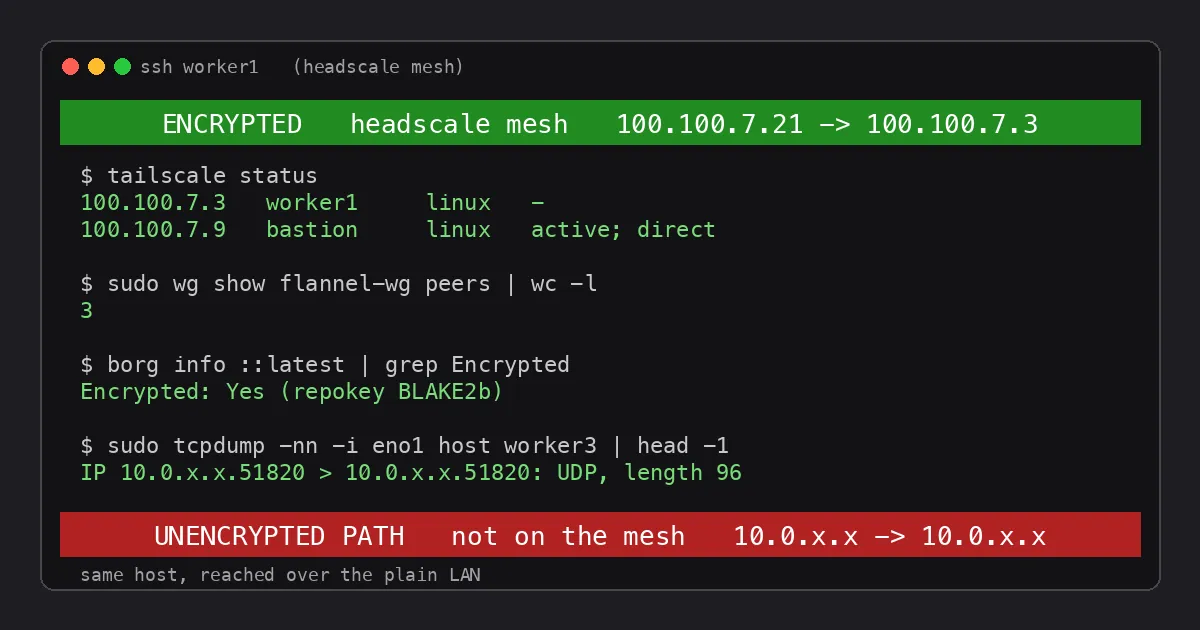
A mesh nobody uses is a science project, so I pointed everything at it. Every SSH alias on my laptop and the bastion now resolves to a mesh address, with a -lan twin kept as the fallback if tailscaled is ever down. The Ansible inventory uses mesh addresses, so Saturday patching rides it too. The Wazuh agents on all six members report to the manager's mesh address. The login banner on every host got a full-width bar: green with ENCRYPTED when the session arrived from a mesh address, red with UNENCRYPTED PATH when it did not. It is a small thing that tells me at a glance which road I took.
The dashboards went further. Wazuh, the SOC page, Homepage and Greenbone only answer on the mesh now. On the plain LAN address they do not exist. Docker publishes those ports, and published ports bypass the host's INPUT chain, so the rules live in Docker's DOCKER-USER chain instead. One gotcha: DOCKER-USER sees packets after Docker's port translation, so a rule matching port 443 never saw the Wazuh dashboard, which had already become port 5601 inside. You match the original destination port with conntrack instead. My Cloudflare tunnel reaches those same dashboards as origins, and it now does so at the mesh address, so the hop from the cluster to the Docker host is WireGuard too.
Not everything can move. Wazuh's agent port stays reachable on the LAN because a couple of laptops that are not mesh members report to it. The UDM's syslog stream, Pi-hole, and the phone's Obsidian sync are consumed by devices that will never join. That is fine. The point was never zero LAN services; it was knowing which ones are there on purpose.
Layer Three: The Backups
After the first two layers I re-ran the capture expecting to be nearly done. On a quiet Wednesday afternoon I nearly was. But the biggest transfer of the day happens at two in the morning, and I had not looked at it. The nodes back up with borg over SSH to the bastion, which is encrypted. The bastion then writes the repositories to my NAS over SMB with signing on, and signing proves integrity without hiding a byte. Worse, the borg repositories themselves had been created with --encryption=none. My etcd snapshots and host configs were readable on the wire once a night and readable at rest on the NAS every minute of the day.
Borg cannot turn encryption on for an existing repository, so this was a re-init. One passphrase per host generated by 1Password, staged onto the hosts over ssh stdin, new repositories created with repokey-blake2, the exported repository keys attached to the same 1Password items, and every staging copy shredded on both ends. The old repositories stay untouched for a week as the only pre-cutover history, then they go.
Two details I am glad I did not skip. First, borg exits 1 for warnings such as a file changing while it was being read, and the archive is still complete. My new script treats only exit 2 and above as failure; the first canary run "failed" on a warning and taught me that. Second, the restore test. I pulled a file out of the new worker1 repository using nothing but the passphrase fetched from 1Password, on a machine that had never seen the key. If you cannot do that, you have not backed anything up; you have made encrypted noise.
With the repositories encrypted, the SMB path carries ciphertext, so sealing the SMB session became optional rather than urgent. I left it for another day.
What the Number Says Now
Same 30 second capture on every host, every byte on the physical NIC:
- Docker host: 94 percent encrypted. The remainder is Pi-hole answering DNS for the house.
- Control plane: 96 percent, after moving etcd's plaintext metrics endpoint onto the mesh as well.
- Workers: between 98.5 and 99.6 percent.
What is left is DNS answers, NTP, ICMP, and devices announcing themselves with SSDP and mDNS. Nothing in that carries anything worth reading. A Datadog dashboard tracks the WireGuard share continuously, and a five minute check on the Headscale server feeds Wazuh: a member going offline is a level 10 alert, a new node registering is level 12, because that should only ever happen right after I cut a key.
What I Would Tell Past Me
- Measure before and after. The 35 percent number is what turned a vague itch into a plan, and the 98 percent is what let me stop.
- Encryption at the wrong layer is a false comfort. The tunnel to my friend's house was strong the whole time. The plaintext was between machines six inches apart.
- Put the network under git before you change the network. The flannel export cost half an hour and made the WireGuard switch a one line pull request with a one line rollback.
- Test the restore, not the backup. Encrypted backups you cannot open are worse than plaintext ones you can.
- Check the whole cluster after every step, not just the thing you changed. The netfilter trap and the borg exit code were both caught that way, and both would have been ugly at 2 AM.
Final Thoughts
None of this needed new hardware, and the only downtime was about 30 seconds of pod network while flannel switched backends, plus two etcd restarts that cost the API server a minute each. What it needed was the willingness to look at what was actually on the wire instead of assuming. I had spent months hardening the hosts and watching the logs, and the traffic between them was in the clear the whole time. The lab is where the opinions get tested. This one failed the test, and now it does not. Still learning :)
Stay safe online!
About Me
I served in the U.S. Army, specializing in Network Switching Systems and was attached to a Patriot Missile System Battalion. After my deployment and Honorable discharge, I went to college in Jacksonville, FL for Computer Science. I have two beautiful and very intelligent daughters. I have more than 20 years professional IT experience. This page is made to learn and have fun. If it's messed up, let me know. I'm still learning! :)
Top Blogs
Popular Projects
Book Board
Weather Loop